 Coachigo
Progress and stats
How to read a client's statistics in Coachigo
Sessions, records, volume, consistency, muscle groups and rep ranges: what a client's statistics show in Coachigo, and how each number is calculated.
A client’s statistics put their whole history on one screen: how often they train, how much they lift, their records and the exercises that have stopped moving. To open them, scroll to the bottom of their profile and tap Detailed statistics.
Pick a time range
Under the Statistics title, the 7 d, 30 d, 90 d or All (default) switch filters almost the whole screen. The Period button at the top right opens Filter by period, with This year or a custom range. A session still in progress already counts in the numbers.
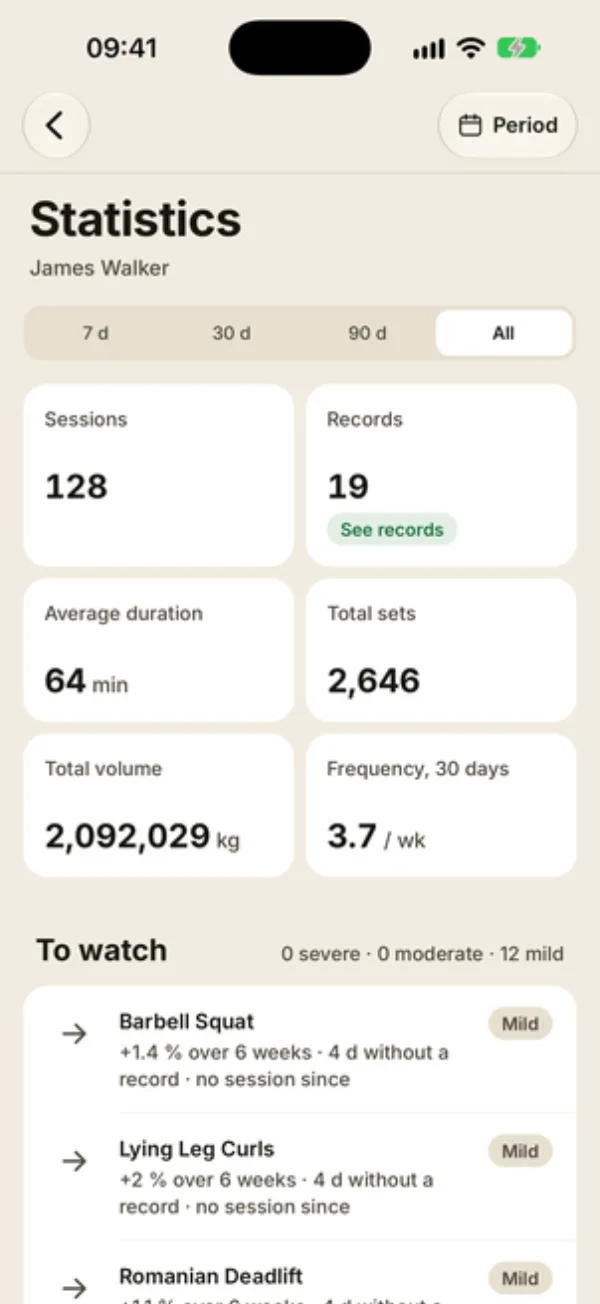
Key numbers
- Sessions: the number of sessions in the range. With 7, 30 or 90 days, the change from the previous period shows underneath.
- Records: the number of exercises trained in the range. Each one has its best set, even if it was only done once. See records jumps to the list at the bottom of the screen.
- Average duration: from opening the session to finishing it. Sessions with no end time or longer than 6 hours are left out.
- Total sets: checked sets.
- Total volume: the sum of weight × reps. Bodyweight and timed exercises count as 0.
- Frequency, 30 days: the average number of sessions per week over the last 30 days. Read it with 30 d, 90 d or All: with 7 d, it only sees one week of sessions and looks lower than it is.
To watch and consistency
To watch lists the exercises that are stalling or slipping, sorted by severity. It’s covered in detail in plateau alerts.
Consistency maps the Last 26 weeks: one colored square per day with a session. Below it:
- Current streak and Longest streak: consecutive days with at least one session. The current streak only counts if the last session was today or yesterday;
- Consistency score: the share of the last 12 weeks with at least one session (green from 70%);
- Sessions per week: the 12-week average, broken down in the bar chart.
This card also follows the range picked at the top of the screen: on 30 d, it only sees one month of sessions, so the consistency score stays low. Stick with All to read it.
Volume and training load
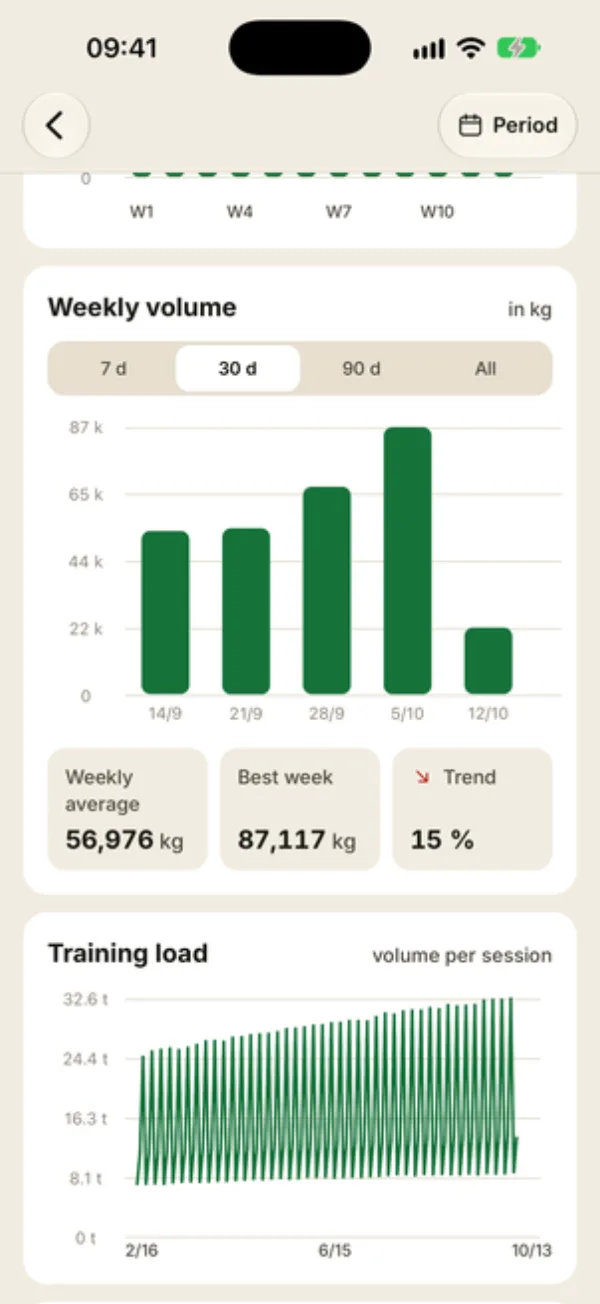
Weekly volume has its own switch (30 days by default), applied on top of the range picked at the top. Each bar is one week, Monday to Sunday; a week with no sessions gets no bar. Below it:
- Weekly average and Best week, based on the weeks with at least one session;
- Trend: volume over the last 15 days compared with the 15 days before (45 days vs. 45 with 90 d). The arrow points up above +5% and down below −5%; the percentage shows without a sign.
The last bar is the current week: until it’s over, it looks low and drags the weekly average down.
Training load plots the volume of each session over time, once your client has more than two.
Exercises, muscle groups and reps
- Progress by exercise: pick an exercise to see its max weight, 1RM or volume over time. For a bodyweight or timed exercise, the line stays at 0: use exercise statistics instead, which track reps or time.
- The Active program card shows its progress and the number of sessions done. Tap it (Details) to open the program’s statistics.
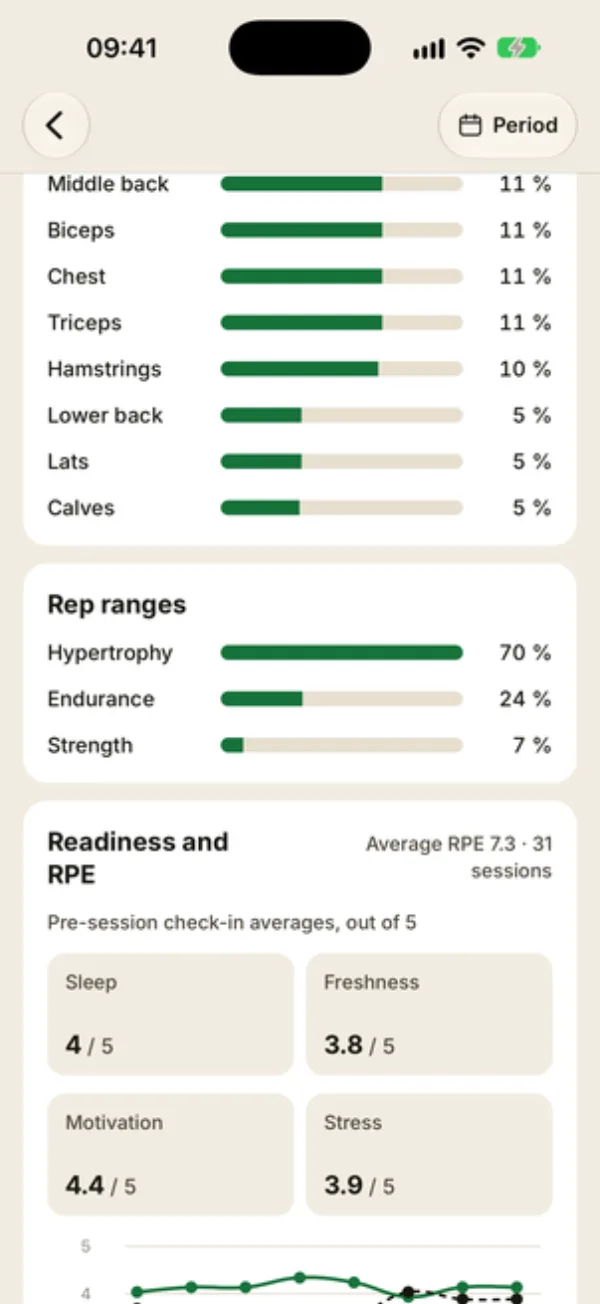
- Muscle group split: each group’s share of the exercises done. It counts exercises, not volume.
- Rep ranges: the share of sets on weighted exercises with 1 to 5 reps (Strength), 6 to 12 (Hypertrophy), 13 to 20 (Endurance), or more than 20 (Endurance+).
Further down, Readiness and RPE sums up check-ins and perceived effort (see readiness and RPE insights), and Records lists the best sets by muscle group (see how records are calculated).
FAQ
Why are some sections missing?
Several blocks need a minimum amount of data: Training load from 3 sessions, To watch with at least 6 sessions and 8 weeks of history on an exercise, Readiness and RPE with at least one check-in in the last 8 weeks. A range that’s too short can hide them too.
My client’s total volume is really low. Is that normal?
Yes, if they train mostly with bodyweight. Volume only counts weight, so push-ups, pull-ups and planks count as 0. For those exercises, open the exercise statistics, which track reps or time.
Why does the number of records change with the range?
Records follow the range you pick: on 30 d, they’re the best sets from the last 30 days. Keep All to see all-time records.