 Coachigo
Workout templates
How to add a circuit to a template in Coachigo
Supersets, circuits, rounds, rest between exercises and between rounds: chain exercises in a Coachigo template and guide your client round by round.
A superset chains two exercises, a circuit three or more: your client does one set of each, rests, then goes again for the next round. In a Coachigo template, you group exercises in a few taps and set the rounds and rest once.
Build the circuit
While creating or editing a template, tap Add exercise and check at least two exercises. A second button shows up next to Add: As a superset for two exercises, As a circuit for three or more. Tap it and the exercises come in grouped, labeled A1, A2, A3…
Two other ways to get there:
- between two collapsed exercises, tap Link to group them into a circuit, or to add an exercise to the circuit next to it;
- under a circuit, Add to circuit opens the list and drops your picks straight into it.
The name updates on its own: Superset A with two exercises, Circuit A beyond that. The next circuit becomes B, then C.
Set rounds and rest
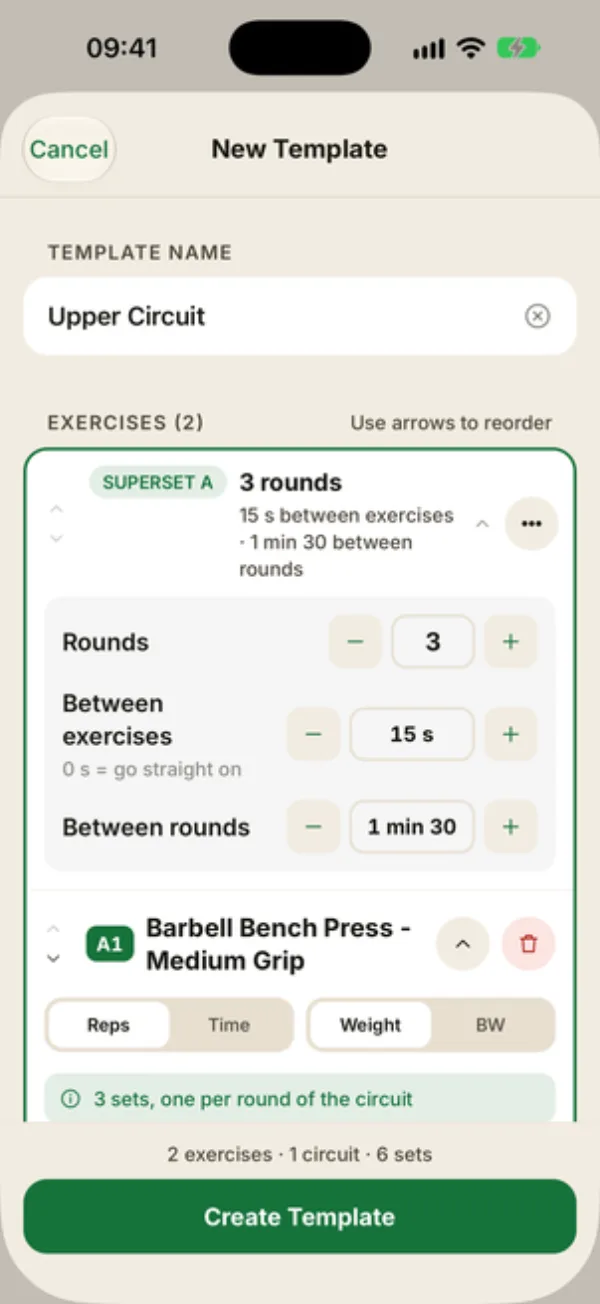
Tap the circuit header to show its settings:
- Rounds: how many times through, up to 20. It starts at the first exercise’s number of sets. Each exercise gets one set per round (“3 sets, one per round of the circuit”);
- Between exercises: the break to move from one exercise to the next. It defaults to 0 s, meaning go straight on;
- Between rounds: the rest at the end of each round, 1 min 30 by default (with Link, it takes the first exercise’s rest if it had one).
On each exercise card, Reps per round sets the target for each pass, and you can still switch the exercise to Time or BW.
Change or undo a circuit
The circuit’s … button offers:
- Set rounds and rests;
- Add an exercise to the circuit;
- Duplicate the circuit, to run two identical blocks back to back;
- Split into separate exercises: they go back to being standalone;
- Delete the circuit and its exercises, after you confirm.
To pull out a single exercise, open its card and tap Take out of the circuit. It moves right after the circuit.
During the session
Coachigo walks your client through it round by round: the header reads “Superset A · Round 1 of 3” and the next set to do is highlighted. After each set, the timer runs the break between exercises, then the rest at the end of the round. At 0 s between exercises there’s no timer: Coachigo just shows the next exercise.
FAQ
Can a timed exercise go in a circuit?
Yes. Switch it to Time and you set seconds per round, handy for planks or jump rope.
The rest between sets disappeared from an exercise in the circuit
That’s expected: inside a circuit, Between exercises and Between rounds take over. If you take the exercise out, its rest between sets is set to what the rest between rounds was, and you can change it.
Can I build a circuit during a session?
Yes. During a live session, tap Link between two exercises, or check several exercises and tap As a superset or As a circuit when you add them. Setting it up in the template just saves you from doing it every time.