 Coachigo
Connecting clients to the app
How to join your coach's profile in Coachigo
Got a 6-character code from your coach? Install Coachigo, enter it, and your sessions sync with theirs. No account needed.
Your coach tracks your training in Coachigo and sent you a code? Use it to join your profile from your own phone: the sessions you log go straight to your coach, and you’ll see the ones they’ve logged too.
Install Coachigo
Download Coachigo from the App Store or Google Play. The app is free, and you don’t need an account to join a profile.
Find “Join a profile”
There are a few ways to get to the same screen:
- the Account tab, USAGE section, Join a profile with a code (always there);
- the home screen while the app is still empty: under “Your coach already uses the app?”, tap Join a profile;
- the + button on your profile list, then Join a profile;
- in Solo mode, the … menu on the home screen, then Join a profile.
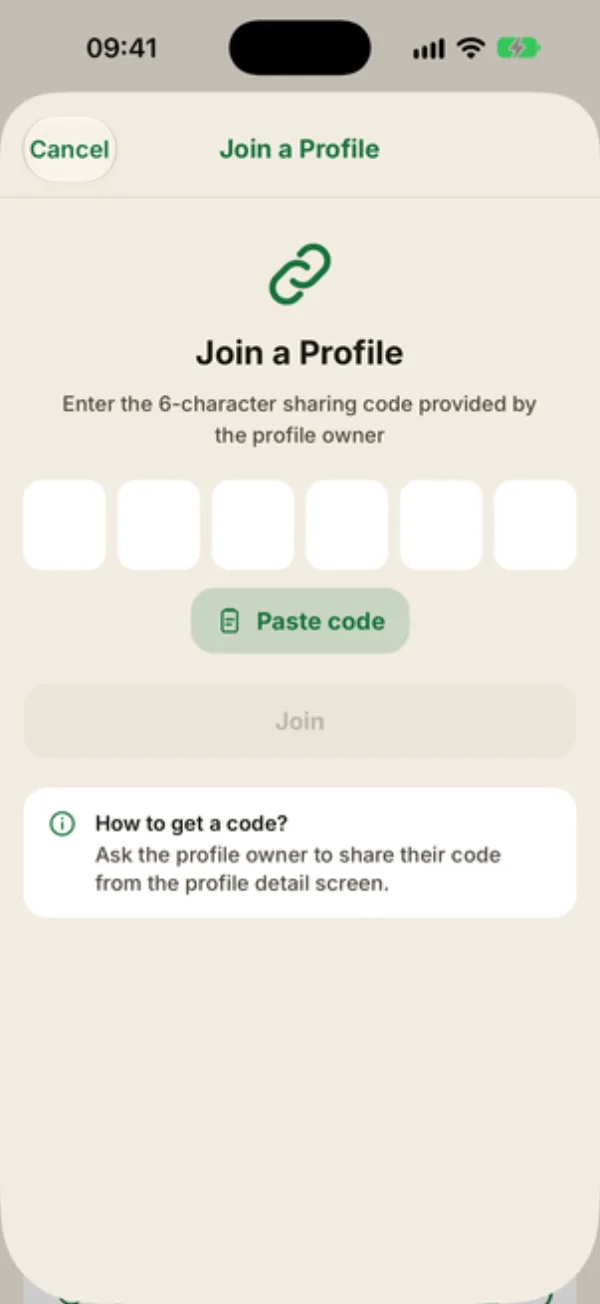
Enter the code
Type the 6 characters into the boxes, or tap Paste code if you copied it from your coach’s message. Upper or lower case both work, and spaces are ignored. Codes never use I, O, 0 or 1, so there’s nothing to mix up.
Tap Join. After “Verifying…”, Coachigo shows Profile Joined! and takes you back to the home screen.
Find your profile
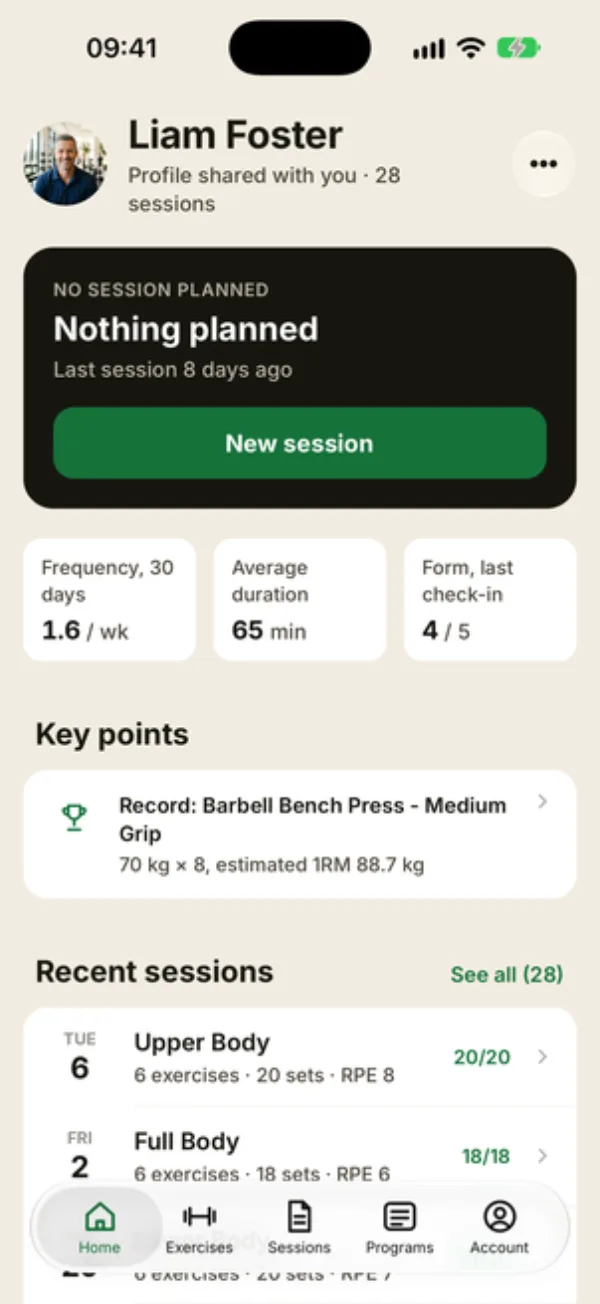
The profile shows up in your app with a Shared tag in the list, and Profile shared with you once you open it. In Solo mode, if you have more than one profile, tap the name at the top of the home screen to switch between them.
You can log your sessions, measurements and photos there. The details are in what your client can do on a shared profile.
If you allow notifications, Coachigo also reminds you of the sessions your coach schedules, 1 hr ahead by default. The lead time and the Session reminders switch are in the Account tab, under Notifications.
If it doesn’t work
"Invalid or expired code"
A code only lasts 7 days, and it stops working as soon as your coach generates a new one. Double-check every character, then ask your coach for the code currently showing on their sharing screen.
"The coach needs Coachigo PRO"
To join a profile, at least one of the two accounts needs Coachigo PRO. If neither does, you’ll see this screen. Ask your coach to upgrade, then tap Try this code again. See Free or PRO.
You might also see “Internet connection required for this action” (joining needs a connection), or “You are already the owner of this profile” if you enter the code for a profile that’s yours.
FAQ
Do I have to pay to join?
Not if your coach has Coachigo PRO. A profile you join doesn’t count toward the free plan’s limit either.
Do I need an account?
Not to join. Creating an account is still handy if you want to get your data back on another device.
Will my coach get notified?
Not with a notification, but you’ll show up right away under Shared with on their sharing screen.